
Student AI Projects
This hub collects AI projects that are small enough for a student to explain but concrete enough to show real engineering judgement. The route begins with handwritten digits because the data format is visible: each image becomes a row, each pixel becomes a feature, and the classifier output can be compared with the expected label. From there, the material moves into a C softmax classifier, a browser playground, and a CIFAR-10 Tiny CNN.
The intended outcome is not just a working demo. A strong student project should answer what data was used, how it was represented, what the model learned, how the result was evaluated, where the errors occurred, and what would be changed in a second version. This hub keeps those questions close to the code and downloadable resources so the project can be reviewed later.
How to Build a Portfolio Narrative
Start with the dataset article and make sure you can explain the shape of the input before discussing accuracy. For handwritten digits, that means understanding the CSV rows, label column, pixel ordering, normalization, and why a flattened vector loses spatial structure. Then study the C classifier to see how a linear model turns those features into class scores. The browser playground adds interaction, but the interaction should still be tied back to model input and output rather than presented as a standalone toy.
The CIFAR-10 CNN material is the next step because color images and convolution introduce a more realistic representation problem. A portfolio explanation should compare the linear digit classifier with the CNN: what changed in the input, what changed in the layers, which errors became easier or harder, and what evidence supports the model’s behavior.
Responsible Use
These projects are meant for learning, course preparation, and portfolio inspiration. They should not be submitted as someone else’s independent coursework. If you adapt the code, keep your own experiment log, parameter choices, screenshots, errors, and conclusions. The value of a student AI project is the explanation of the process, not only the final accuracy number or a polished browser demo.
Evidence to Preserve
A project becomes reviewable when it preserves evidence. Keep the dataset description, preprocessing notes, model structure, training command, validation split, metric output, screenshots, and at least one error analysis example. If you only keep the final demo, a reviewer cannot tell whether the model learned the task, memorized the data, or received a misleading input representation.
For handwritten digits, preserve examples of misclassified images and explain whether the error comes from handwriting ambiguity, normalization, model capacity, or a data formatting mistake. For CIFAR-10, preserve class-level mistakes and compare them with the simpler digit classifier. That comparison shows that the project is a learning progression, not a disconnected collection of demos.
Project Review Questions
Before presenting a project, answer a small review checklist: what is the input, what is the target, what is the baseline, what changed during training, how was the result measured, and what limitation remains? These questions make the work easier to explain in a class, interview, or portfolio page because they connect the interface, the code, and the model behavior.
The same checklist also helps avoid inflated claims. A browser demo may be useful, but it does not prove production readiness. A high accuracy number may be encouraging, but it does not prove robust generalization. A good student project is honest about scale, data, limitations, and what the next version would test.
Student Project Review Rubric
| Review dimension | Minimum requirement | Stronger evidence |
|---|---|---|
| Data | State the source, fields, labels, and sample count. | Add license, preprocessing notes, unusual samples, and train/test isolation. |
| Code | The experiment can be reproduced with a run command. | Record dependency versions, random seed, error handling, and key function roles. |
| Experiment | Report one main metric. | Add a baseline, confusion matrix, error cases, parameter changes, and failure analysis. |
| Presentation | Include a screenshot or browser demo. | Map interface input and output back to features, probabilities, and limitations. |
| Boundary | State that the project is a learning experiment. | Explain why it is not production-ready and what a second version must validate. |
Topic hub
Student AI Projects
A portfolio-friendly hub for handwritten digits, dataset formats, C classifiers, browser demos, and CNN projects.
Built for searches around handwritten digit recognition projects, C softmax classifiers, student AI projects, and browser AI playgrounds.
Editorial notes
Why these articles belong in one route
Student AI projects often stop at a demo that runs. This hub separates data format, model output, error analysis, browser interaction, and portfolio explanation so readers can explain what they built.
The handwritten digit route starts with CSV layout and 28 by 28 pixels before moving into the C softmax classifier. Each predicted probability can be traced back to the input vector, weights, and training loop.
The CIFAR-10 Tiny CNN is the next step, using image input, convolution layers, and training logs to show how the project moves from a linear classifier to a convolutional network.
What you will build
You will start from CSV data structure, run a C classifier, then connect the idea to browser drawing input and a CIFAR-10 CNN.
Recommended reading order
Start with concepts, then move into runnable projects
Handwritten Digit Dataset Basics
Read train.csv, test.csv, labels, and the flattened 28 by 28 pixel layout before training the classifier.
Handwritten Digit Softmax in C
Follow the C implementation from logits and softmax probabilities to confusion matrices and submission export.
Handwritten Digit Playground Notes
See how the offline classifier was adapted into a browser demo with drawing input and probability output.
CIFAR-10 Tiny CNN Tutorial in C
Build and train a small convolutional neural network for CIFAR-10 image classification, then read its loss and accuracy output.
Resources and distribution assets
Code, data, diagrams, and share assets in one place
AI Learning Project / CODE
digit_softmax_classifier.c
The C source for the handwritten digit softmax classifier.
AI Learning Project / DATASET
train.csv.zip
Compressed handwritten digit training set with 42000 labeled samples.
AI Learning Project / DATASET
test.csv.zip
Compressed handwritten digit test set with 28000 unlabeled samples.
AI Learning Project / DATASET
digit-playground-model.json
The compact softmax demo model and sample set used by the browser playground.
AI Learning Project / DIAGRAM
digit-sample-grid.svg
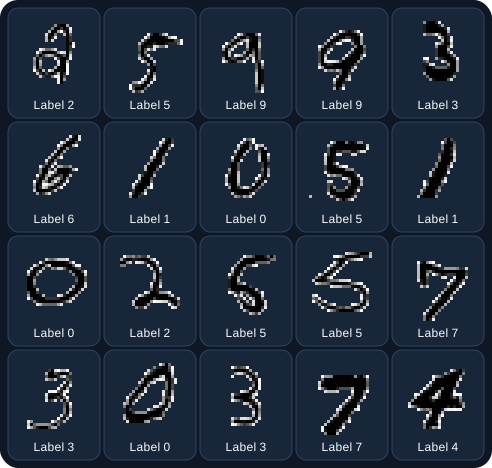
A small handwritten digit preview grid extracted from the training set.
AI Learning Project / ARCHIVE
Handwritten digit project bundle
Contains the source file, compressed datasets, submission files, browser model, and preview grid.
AI Learning Project / CODE
cifar10_tiny_cnn.c source
Single-file C tiny CNN with CIFAR-10 loading, convolution, pooling, softmax, and backpropagation.
AI Learning Project / SOCIAL
Student AI Projects share card
A 1200x630 SVG card for handwritten digits, C classifiers, and browser demos.
Site Building Project / VIDEO
SEO distribution short-video storyboards
Four 45-60 second storyboard scripts ready for later Remotion production.
FAQ
Direct answers to common search questions
Can these projects be used in a course portfolio?
They are suitable as learning and portfolio references, but course submissions should include your own experiment logs, parameter choices, and error analysis.
Will full datasets be hosted on the site?
No large full datasets are published here. The site hosts small samples, code, explanations, and necessary public companion files.