中文
人物图片转 SVG 动画资产管线:ComfyUI、Grounded-SAM、OpenPose 与 vtracer
2D 动画制作的第一步不是直接补间,也不是马上画骨骼,而是先把角色拆成可以独立移动、独立修正、独立导出的资产层。一个人物图片如果仍然是单张像素图,后续无论用关键帧、骨骼还是表情替换,都会很难控制局部运动。
因此我在实用功能页加入了一个浏览器端工具:动画资产生成器。它把输入的人物或动漫角色图片转成 SVG、分层 PNG 和资产清单。处理过程只在浏览器里发生,不上传文件,也不占用服务器存储。
一、为什么先做分割与分层
动画资产的核心目标是把“整张角色图”改造成“可操作的结构”。常见图层包括头发、脸、眼睛、衣服、手臂、腿、阴影和高光。分层之后,动画系统才能对每一层设置锚点、旋转中心、遮罩关系和关键帧。
如果用数学方式描述,原图可以看成像素函数:
I(x, y) = [R, G, B, A]
分割的目标是给每个像素分配一个图层标签:
L(x, y) in {0, 1, 2, ..., K - 1}
理想情况下,同一块头发或衣服应该落在同一个标签里,相邻但语义不同的区域应该分开。这个标签图就是后续 SVG 矢量化、PNG 图层导出和动画绑定的基础。
二、浏览器工具采用的本地管线
网站上的第一版工具不调用云端 AI,也不加载大型模型。它使用的是轻量浏览器管线:
- 用 Canvas 在本地解码图片。
- 进行边缘保留上采样,尽量保留动漫赛璐璐硬边。
- 用 RGB 颜色聚类近似分割角色区域。
- 用连通域过滤去掉太小的碎片。
- 为每个图层生成透明 PNG。
- 把每个图层的水平像素 run 写成 SVG path。
- 导出
manifest.json,记录尺寸、颜色、图层面积和分块数量。
这不是 SAM 的替代品,而是一个不消耗服务器算力的快速草稿工具。它适合干净角色图、透明背景、硬边线稿和赛璐璐上色。对于复杂背景、半透明发丝、渐变阴影或真实照片,离线 SAM 管线更可靠。
三、生产级离线管线:ComfyUI + Grounded-SAM + vtracer
如果要获得更接近生产资产的结果,推荐在本机跑离线脚本,而不是把图片上传到服务器。基础脚本是 sam_vtracer_pipeline.py;更完整的生产脚本是 comfyui_grounded_sam_vtracer_pipeline.py。
生产级流程可以拆成三层:
多角度角色参考图
-> ComfyUI: IP-Adapter 锁定角色特征
-> ComfyUI: ControlNet OpenPose 强制拆件排版
-> Grounded-SAM: 用文本 prompt 抠出语义部件
-> vtracer: 透明 PNG 部件转 SVG
-> Python: 注入稳定 id,合并为 character-rig-layered.svg
3.1 角色特征锁定:IP-Adapter
IP-Adapter 的作用不是简单“参考风格”,而是把正脸、侧脸、服饰细节和局部特写编码成图像条件。对于动画资产,它解决的是角色一致性问题:发色、瞳孔、耳朵形状、刀疤、饰品和服装轮廓应该在每张生成图里保持同一套视觉身份。
离线模板 comfyui_exploded_character_workflow.template.json 使用占位符,让脚本把参考图上传到本机 ComfyUI 后替换为 __REFERENCE_IMAGE_1__。实际节点名会因 ComfyUI 插件版本不同而变化,所以模板是可编辑的 API 工作流,而不是服务器端固定服务。
3.2 姿态剥离:OpenPose Exploded View
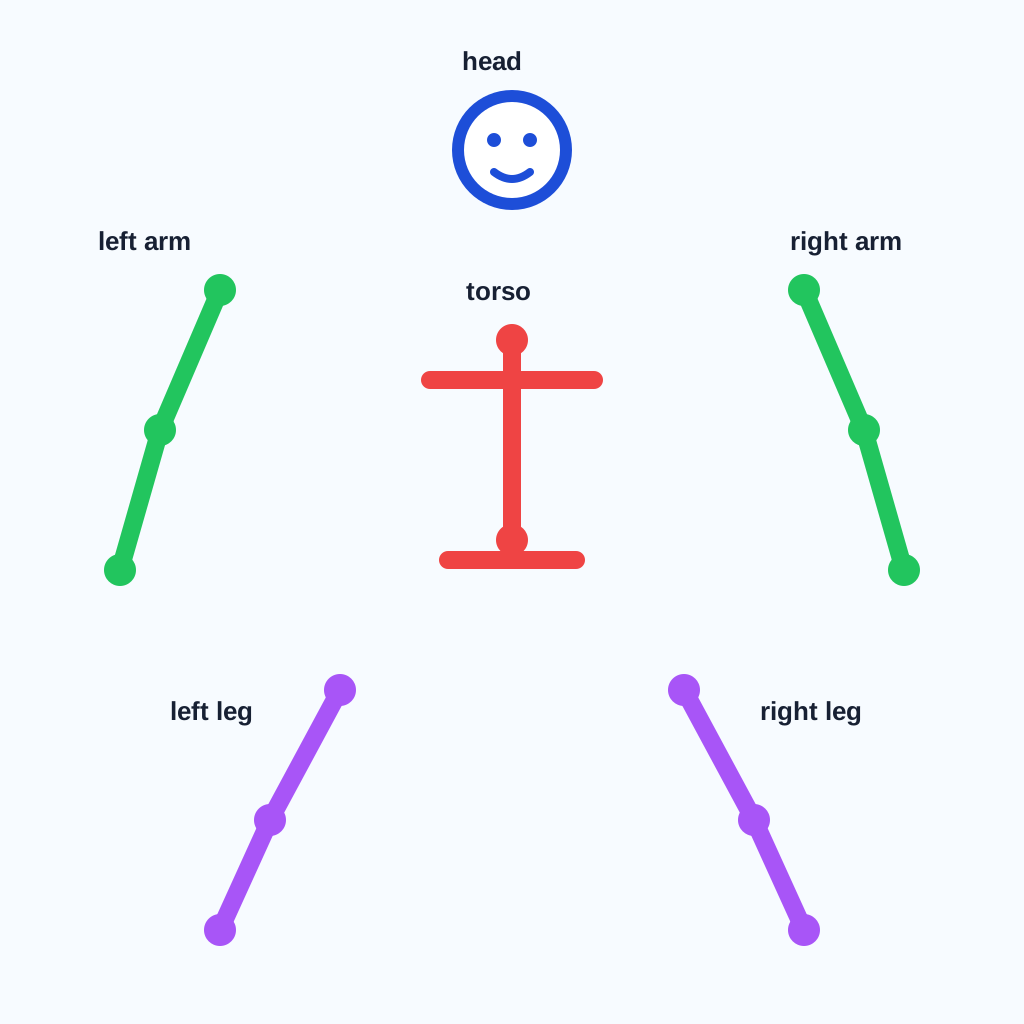
传统立绘经常有手臂压住胸口、头发盖住肩膀、武器挡住腿的问题。这样的图即使画得漂亮,也不适合作为可绑定资产。拆件排版的目标是让头、躯干、左臂、右臂、腿、尾巴和饰品互不遮挡。
我放了一个 拆件 OpenPose 骨架参考图。你可以把它导出成 PNG,然后喂给 ControlNet OpenPose。这样 ComfyUI 生成的不是“完整站姿角色”,而是一张纯色背景上的“散装角色部件板”。
3.3 语义级抠图:Grounding DINO + SAM
坐标裁剪不可靠,因为生成图里的部件大小和位置会随 seed 变化。Grounded-SAM 更适合自动化:Grounding DINO 先根据文本找框,例如 left arm、wolf head、headband;SAM 再把框内真实轮廓变成 alpha mask。
下载的 part_prompts.example.json 给出了默认部件清单。脚本会为每个部件输出透明 PNG,并在 manifest 中记录文本 prompt、检测分数和边界框。
3.4 SVG 装配:稳定 ID 与骨骼资产库
vtracer 负责把每个透明 PNG 部件转成干净 SVG path。最后 Python 会把这些路径合并进一个 SVG,并给每个组写入稳定 ID:
<g id="left-arm">...</g>
<g id="right-arm">...</g>
<g id="wolf-head">...</g>
这一步非常关键。没有稳定 ID,后续动画软件或网页运行时就无法可靠地找到左臂、右臂、头部和饰品;有了稳定 ID,才可以继续写锚点、父子层级、骨骼绑定和关键帧。
四、超分辨率为什么放在矢量化前
很多动漫图像在缩放后会出现锯齿、断线和颜色混合。矢量化算法看到这些噪声后,会生成大量短路径,导致 SVG 变大、边缘变脏。
所以超分辨率或边缘保留上采样应该放在矢量化之前。目标不是凭空生成细节,而是让轮廓更稳定,让同色区域更连贯。浏览器工具采用轻量的硬边上采样和锐化;离线工作流可以替换成本机 anime upscaler,例如 Real-ESRGAN 动漫模型或其他本地超分工具。
五、资产包应该怎样复核
生成资产后,不要只看 SVG 是否好看。更重要的是检查它是否适合动画:
- 头发、脸、衣服和手臂是否被拆成可操作层。
- SVG 是否过大,是否包含过多碎片。
- 图层 PNG 是否保留透明背景。
- manifest 中的面积和分块数量是否合理。
- 后续绑定时是否能找到旋转锚点。
如果图层过碎,可以提高细节阈值或减少目标图层数。如果角色结构混在一起,可以先用离线 SAM 分割,再用 vtracer 单独矢量化每个 mask。
六、这篇文章在 2D 动画专栏中的位置
这篇是 2D 动画原理专栏的第一步:资产生成。后续可以继续写锚点、父子层级、骨骼绑定、关键帧、缓动曲线、补间、遮罩和镜头运动。只有先把角色拆成干净资产,后面的动画原理才有落地对象。
直接使用入口:动画资产生成器。它适合在浏览器里快速验证一个角色图是否能拆层;真正要做作品时,再把离线脚本、人工修图和动画软件结合起来。
英文
Character Image to SVG Animation Asset Pipeline: ComfyUI, Grounded-SAM, OpenPose, and vtracer
在独立页面打开The first step in 2D animation is not interpolation or rigging. It is asset preparation: turning one flat character image into separate layers that can move, be corrected, and be exported independently. If a character remains a single raster image, later keyframes, skeletal rigs, and expression swaps become hard to control.
That is why I added a browser-side tool to the site: Animation Asset Lab. It converts a local character or anime image into SVG, layered PNG files, and an asset manifest. Processing happens in the browser only. The file is not uploaded and the server does not store the result.
1. Why segmentation comes first
The goal is to change a flat character picture into an editable structure. Typical layers include hair, face, eyes, clothes, arms, legs, shadows, and highlights. Once those layers exist, an animation system can assign anchors, rotation centers, masks, and keyframes.
Mathematically, the image can be treated as a pixel function:
I(x, y) = [R, G, B, A]
Segmentation assigns each pixel to a layer label:
L(x, y) in {0, 1, 2, ..., K - 1}
Ideally, one piece of hair or clothing lands in one label, while adjacent but semantically different regions are separated. That label map becomes the base for SVG vectorization, PNG layer export, and animation rigging.
2. The local browser pipeline
The first website version does not call a cloud AI model or load a huge browser model. It uses a lightweight local pipeline:
- Decode the image locally with Canvas.
- Run edge-preserving upscaling to keep cel-style hard edges readable.
- Use RGB color clustering to approximate character segmentation.
- Filter tiny connected components.
- Export transparent PNG files for each layer.
- Convert horizontal pixel runs into SVG paths.
- Write a
manifest.jsonfile with dimensions, colors, layer area, and segment counts.
This is not a replacement for SAM. It is a fast draft tool that avoids server compute and server storage. It works best with clean character art, transparent backgrounds, hard line art, and cel shading. For complex backgrounds, translucent hair, gradients, or real photos, the offline SAM workflow is more reliable.
3. Production local pipeline: ComfyUI + Grounded-SAM + vtracer
For cleaner production assets, run the heavier pipeline on your own machine rather than uploading private images to the website. The basic script is sam_vtracer_pipeline.py; the complete production coordinator is comfyui_grounded_sam_vtracer_pipeline.py.
The production workflow has three layers:
Multi-view character references
-> ComfyUI: IP-Adapter locks character identity
-> ComfyUI: ControlNet OpenPose forces an exploded layout
-> Grounded-SAM: text prompts cut semantic parts
-> vtracer: transparent PNG parts become SVG paths
-> Python: stable IDs are injected into character-rig-layered.svg
3.1 Character identity lock: IP-Adapter
IP-Adapter is not just a loose style reference. It encodes front views, side views, outfit details, and close-ups as image conditions. For animation assets, this solves character consistency: hair color, eye color, ears, scars, accessories, and clothing silhouettes should remain the same across generated sheets.
The downloadable comfyui_exploded_character_workflow.template.json uses placeholders so the script can upload local reference images to local ComfyUI and replace __REFERENCE_IMAGE_1__. Node names differ across ComfyUI custom-node installations, so this is an editable API workflow template rather than a hosted service.
3.2 Pose stripping: OpenPose exploded view
Normal character illustrations often place an arm across the torso, hair over the shoulder, or a weapon in front of the legs. Those images may look good, but they are poor rigging assets. The goal of exploded layout is to keep head, torso, left arm, right arm, legs, tail, and accessories separated.
I added an exploded OpenPose skeleton reference. Export it to PNG if your ControlNet workflow expects a bitmap, then feed it into OpenPose ControlNet. ComfyUI should generate a flat-background character part sheet rather than a single overlapping full-body pose.
3.3 Semantic matting: Grounding DINO + SAM
Coordinate cropping is fragile because each seed changes exact positions and proportions. Grounded-SAM is better for automation: Grounding DINO locates text prompts such as left arm, wolf head, and headband; SAM converts each detected box into a precise alpha mask.
The downloadable part_prompts.example.json provides a default part list. The script writes a transparent PNG for each part and records the prompt, score, and bounding box in the manifest.
3.4 SVG assembly: stable IDs and rig assets
vtracer converts each transparent part PNG into clean SVG paths. Python then combines those paths into one SVG and wraps each part with a stable ID:
<g id="left-arm">...</g>
<g id="right-arm">...</g>
<g id="wolf-head">...</g>
This step matters. Without stable IDs, animation software or a browser runtime cannot reliably find the left arm, right arm, head, and accessories. With stable IDs, the next articles can build anchors, parent-child layers, rigs, and keyframes on top of those parts.
4. Why upscaling belongs before vectorization
Low-resolution anime images often show jagged edges, broken line art, and mixed colors after scaling. A vectorizer sees those artifacts as real boundaries and may create many short paths, which makes the SVG larger and dirtier.
Upscaling or edge-preserving resampling should happen before vectorization. The goal is not to invent detail. The goal is to stabilize contours and make same-color regions more coherent. The browser tool uses a light hard-edge upsample and sharpening step. A heavier local workflow can replace that with an anime-focused upscaler such as a local Real-ESRGAN anime model.
5. How to review the generated asset pack
After generating assets, do not only ask whether the SVG looks attractive. Ask whether it can animate:
- Are hair, face, clothes, and arms separated into usable layers?
- Is the SVG too large or too fragmented?
- Do layer PNG files preserve transparency?
- Do the manifest area and segment counts look reasonable?
- Can you identify anchor points for later rigging?
If the result is too fragmented, raise the detail threshold or reduce the target layer count. If character structures are mixed together, segment with SAM locally first and then vectorize each mask with vtracer.
6. Where this fits in the 2D animation column
This is the first step in the 2D animation principles column: asset generation. The next steps can cover anchors, parent-child layers, skeletal rigs, keyframes, easing curves, interpolation, masks, and camera movement. Those topics need clean assets first.
Use the tool here: Animation Asset Lab. It is best for quickly checking whether a character image can be separated into layers. For finished work, combine the offline script, manual cleanup, and animation software.
2D 动画制作的第一步不是直接补间,也不是马上画骨骼,而是先把角色拆成可以独立移动、独立修正、独立导出的资产层。一个人物图片如果仍然是单张像素图,后续无论用关键帧、骨骼还是表情替换,都会很难控制局部运动。
因此我在实用功能页加入了一个浏览器端工具:动画资产生成器。它把输入的人物或动漫角色图片转成 SVG、分层 PNG 和资产清单。处理过程只在浏览器里发生,不上传文件,也不占用服务器存储。
一、为什么先做分割与分层
动画资产的核心目标是把“整张角色图”改造成“可操作的结构”。常见图层包括头发、脸、眼睛、衣服、手臂、腿、阴影和高光。分层之后,动画系统才能对每一层设置锚点、旋转中心、遮罩关系和关键帧。
如果用数学方式描述,原图可以看成像素函数:
I(x, y) = [R, G, B, A]
分割的目标是给每个像素分配一个图层标签:
L(x, y) in {0, 1, 2, ..., K - 1}
理想情况下,同一块头发或衣服应该落在同一个标签里,相邻但语义不同的区域应该分开。这个标签图就是后续 SVG 矢量化、PNG 图层导出和动画绑定的基础。
二、浏览器工具采用的本地管线
网站上的第一版工具不调用云端 AI,也不加载大型模型。它使用的是轻量浏览器管线:
- 用 Canvas 在本地解码图片。
- 进行边缘保留上采样,尽量保留动漫赛璐璐硬边。
- 用 RGB 颜色聚类近似分割角色区域。
- 用连通域过滤去掉太小的碎片。
- 为每个图层生成透明 PNG。
- 把每个图层的水平像素 run 写成 SVG path。
- 导出
manifest.json,记录尺寸、颜色、图层面积和分块数量。
这不是 SAM 的替代品,而是一个不消耗服务器算力的快速草稿工具。它适合干净角色图、透明背景、硬边线稿和赛璐璐上色。对于复杂背景、半透明发丝、渐变阴影或真实照片,离线 SAM 管线更可靠。
三、生产级离线管线:ComfyUI + Grounded-SAM + vtracer
如果要获得更接近生产资产的结果,推荐在本机跑离线脚本,而不是把图片上传到服务器。基础脚本是 sam_vtracer_pipeline.py;更完整的生产脚本是 comfyui_grounded_sam_vtracer_pipeline.py。
生产级流程可以拆成三层:
多角度角色参考图
-> ComfyUI: IP-Adapter 锁定角色特征
-> ComfyUI: ControlNet OpenPose 强制拆件排版
-> Grounded-SAM: 用文本 prompt 抠出语义部件
-> vtracer: 透明 PNG 部件转 SVG
-> Python: 注入稳定 id,合并为 character-rig-layered.svg
3.1 角色特征锁定:IP-Adapter
IP-Adapter 的作用不是简单“参考风格”,而是把正脸、侧脸、服饰细节和局部特写编码成图像条件。对于动画资产,它解决的是角色一致性问题:发色、瞳孔、耳朵形状、刀疤、饰品和服装轮廓应该在每张生成图里保持同一套视觉身份。
离线模板 comfyui_exploded_character_workflow.template.json 使用占位符,让脚本把参考图上传到本机 ComfyUI 后替换为 __REFERENCE_IMAGE_1__。实际节点名会因 ComfyUI 插件版本不同而变化,所以模板是可编辑的 API 工作流,而不是服务器端固定服务。
3.2 姿态剥离:OpenPose Exploded View
传统立绘经常有手臂压住胸口、头发盖住肩膀、武器挡住腿的问题。这样的图即使画得漂亮,也不适合作为可绑定资产。拆件排版的目标是让头、躯干、左臂、右臂、腿、尾巴和饰品互不遮挡。
我放了一个 拆件 OpenPose 骨架参考图。你可以把它导出成 PNG,然后喂给 ControlNet OpenPose。这样 ComfyUI 生成的不是“完整站姿角色”,而是一张纯色背景上的“散装角色部件板”。
3.3 语义级抠图:Grounding DINO + SAM
坐标裁剪不可靠,因为生成图里的部件大小和位置会随 seed 变化。Grounded-SAM 更适合自动化:Grounding DINO 先根据文本找框,例如 left arm、wolf head、headband;SAM 再把框内真实轮廓变成 alpha mask。
下载的 part_prompts.example.json 给出了默认部件清单。脚本会为每个部件输出透明 PNG,并在 manifest 中记录文本 prompt、检测分数和边界框。
3.4 SVG 装配:稳定 ID 与骨骼资产库
vtracer 负责把每个透明 PNG 部件转成干净 SVG path。最后 Python 会把这些路径合并进一个 SVG,并给每个组写入稳定 ID:
<g id="left-arm">...</g>
<g id="right-arm">...</g>
<g id="wolf-head">...</g>
这一步非常关键。没有稳定 ID,后续动画软件或网页运行时就无法可靠地找到左臂、右臂、头部和饰品;有了稳定 ID,才可以继续写锚点、父子层级、骨骼绑定和关键帧。
四、超分辨率为什么放在矢量化前
很多动漫图像在缩放后会出现锯齿、断线和颜色混合。矢量化算法看到这些噪声后,会生成大量短路径,导致 SVG 变大、边缘变脏。
所以超分辨率或边缘保留上采样应该放在矢量化之前。目标不是凭空生成细节,而是让轮廓更稳定,让同色区域更连贯。浏览器工具采用轻量的硬边上采样和锐化;离线工作流可以替换成本机 anime upscaler,例如 Real-ESRGAN 动漫模型或其他本地超分工具。
五、资产包应该怎样复核
生成资产后,不要只看 SVG 是否好看。更重要的是检查它是否适合动画:
- 头发、脸、衣服和手臂是否被拆成可操作层。
- SVG 是否过大,是否包含过多碎片。
- 图层 PNG 是否保留透明背景。
- manifest 中的面积和分块数量是否合理。
- 后续绑定时是否能找到旋转锚点。
如果图层过碎,可以提高细节阈值或减少目标图层数。如果角色结构混在一起,可以先用离线 SAM 分割,再用 vtracer 单独矢量化每个 mask。
六、这篇文章在 2D 动画专栏中的位置
这篇是 2D 动画原理专栏的第一步:资产生成。后续可以继续写锚点、父子层级、骨骼绑定、关键帧、缓动曲线、补间、遮罩和镜头运动。只有先把角色拆成干净资产,后面的动画原理才有落地对象。
直接使用入口:动画资产生成器。它适合在浏览器里快速验证一个角色图是否能拆层;真正要做作品时,再把离线脚本、人工修图和动画软件结合起来。
搜索问题
常见问题
这篇文章适合谁读?
这篇文章适合想用 实战 难度理解“人物图片转 SVG 动画资产管线:ComfyUI、Grounded-SAM、OpenPose 与 vtracer”的读者,预计阅读时间约 14 分钟,重点覆盖 ComfyUI, IP-Adapter, OpenPose, Grounded-SAM。
读完后下一步应该看什么?
可以从文末相关阅读、项目页和知识图谱继续进入相邻主题。
这篇文章有没有可运行代码或配套资源?
有。页面里的运行说明、资源卡片和下载入口会指向复现实验所需的命令、数据、代码或说明文件。
能不能在浏览器实验台里操作?
可以。读完文章后可以打开算法实验台或知识图谱,观察 8 皇后、K-means 或手写数字演示的状态变化。
文章上下文
算法实现项目
围绕回溯、位运算和聚类实现,保留可以复查的代码、流程图和下载资料。
2D 动画原理专栏第一篇:用 ComfyUI IP-Adapter、OpenPose 拆件、Grounded-SAM 抠图和 vtracer 生成 SVG 骨骼资产库。
打开分享中心配套资源
算法实现项目 / SOURCE
基础 SAM + vtracer 脚本
本机运行的角色图片分割、PNG 图层和 SVG 矢量化参考脚本。
算法实现项目 / SOURCE
ComfyUI + Grounded-SAM 生产脚本
调度本机 ComfyUI、Grounding DINO、SAM 和 vtracer,生成带稳定 ID 的 SVG 骨骼资产。
算法实现项目 / GUIDE
ComfyUI 拆件角色工作流模板
IP-Adapter 锁定角色特征,ControlNet OpenPose 约束拆件排版的可编辑 API 模板。
算法实现项目 / DIAGRAM
拆件 OpenPose 骨架图
用于生成头、躯干、手脚分开的角色部件板,可导出 PNG 后喂给 ControlNet。
算法实现项目 / DATASET
动画部件 prompt 清单
Grounding DINO 使用的 head、left arm、torso、tail、accessory 等语义抠图提示词。
项目时间线
已发布文章
- 人物图片转 SVG 动画资产管线:ComfyUI、Grounded-SAM、OpenPose 与 vtracer 2D 动画原理专栏第一篇:用 ComfyUI IP-Adapter、OpenPose 拆件、Grounded-SAM 抠图和 vtracer 生成 SVG 骨骼资产库。
- 回溯算法入门:用 C 和 Python 解决 8 皇后问题 用 C 和 Python 讲清楚 8 皇后回溯搜索的状态表示、冲突判断、递归过程与完整求解思路。
- 回溯算法进阶:用位运算优化 8 皇后(C / Python) 介绍如何用位运算优化 8 皇后搜索,降低状态判断成本,并给出 C / Python 对照实现。
- K-means 聚类算法入门:基于 Iris 数据集的 C 语言实现 结合 Iris.csv、C 语言源码、流程图和可视化,完整讲解 K-means++ 初始化、迭代收敛与结果分析。
- 图片转 Unicode 四象限 ANSI:原理、实现与浏览器工具 解释如何把任意图片压缩成 truecolor Unicode 四象限 ANSI:2 x 2 像素、两色最小误差、.ans 文件和浏览器端隐私边界。
已公开资源
- Iris.csv 数据集 K-means 文章使用的 150 条 Iris 样本。
- Iris_sort_K_mean.c 源码 包含标准化、K-means++ 初始化、多次重启和 SSE 选择。
- K-means 流程图 对应 C 程序执行顺序的 SVG 流程图。
- 聚类可视化图 基于花瓣长度和花瓣宽度投影的二维散点图。
- K-means 打包下载 包含数据、源码、流程图和可视化图。
- 高数联系 PDF 公开下载的高数课程 PDF,适合复习或打印。
- 基础 SAM + vtracer 脚本 本机运行的角色图片分割、PNG 图层和 SVG 矢量化参考脚本。
- ComfyUI + Grounded-SAM 生产脚本 调度本机 ComfyUI、Grounding DINO、SAM 和 vtracer,生成带稳定 ID 的 SVG 骨骼资产。
- ComfyUI 拆件角色工作流模板 IP-Adapter 锁定角色特征,ControlNet OpenPose 约束拆件排版的可编辑 API 模板。
- 拆件 OpenPose 骨架图 用于生成头、躯干、手脚分开的角色部件板,可导出 PNG 后喂给 ControlNet。
- 动画部件 prompt 清单 Grounding DINO 使用的 head、left arm、torso、tail、accessory 等语义抠图提示词。
- 算法可视化专题分享图 用于分享 8 皇后、回溯、位运算和实验台专题页的 1200x630 SVG 图。
- K-means 一轮迭代动画 Remotion 生成的短动画,展示样本分配、质心更新和 SSE 下降。
- 8 皇后回溯搜索动画 Remotion 生成的短动画,展示逐行尝试、冲突剪枝和回溯。
当前学习路线
- 用 C 和 Python 解决 8 皇后问题 学习路线节点
- 用位运算优化 8 皇后 学习路线节点
- 基于 Iris 数据集的 K-means C 语言实现 学习路线节点
- K-means 代码、数据和图示下载 学习路线节点
下一步计划
- 补充更多算法题的可运行实现
- 为下载资源增加更多示例输入
