

Turning battery test records into a model involves preparing data, fitting parameters, validating predictions and writing a report. I built VoltSift to bring those steps into one online workspace. Upload CSV files, fit a cell model automatically and check its voltage errors against an independent test record.
If you work on battery development, evaluate BMS algorithms or need to report on cell tests, you can start with your own data. Register and verify your email to receive one free analysis, available for seven days.
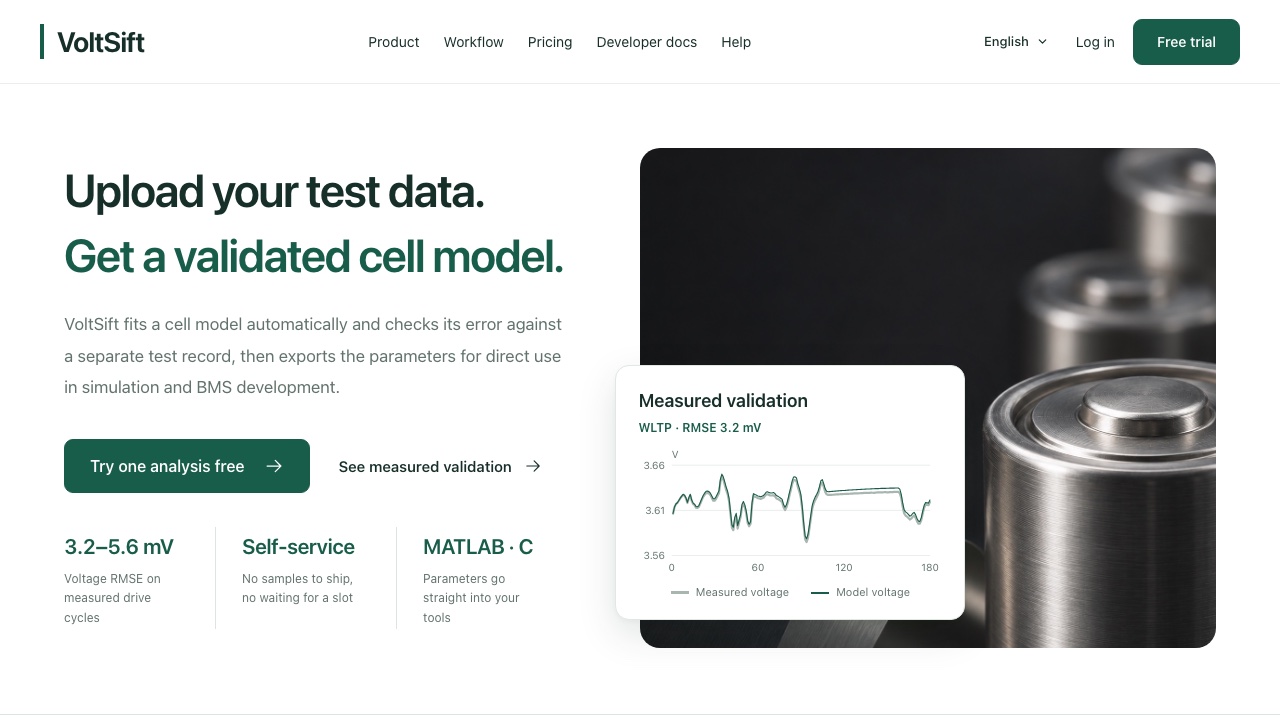
Validation results on public measured data
I tested the VoltSift model on public measured records from a CALB L148N58A prismatic cell (#60129) at 25 °C. The model was fitted on the training records and locked before the validation voltages of three drive cycles were read. The statistics cover valid data points at SOC 20%–100%.
| Drive cycle | Scored points | Voltage RMSE | Maximum error |
|---|---|---|---|
| WLTP | 196,221 | 3.217 mV | 13.051 mV |
| UDDS | 239,440 | 5.600 mV | 13.687 mV |
| US06 | 79,885 | 4.504 mV | 12.594 mV |
All three drive cycles fall within the VoltSift standard acceptance thresholds (RMSE ≤ 10 mV, maximum error ≤ 30 mV). Fasolato et al. published the dataset on Mendeley Data under CC BY 4.0. The VoltSift homepage shows the voltage comparison and error distribution for these records, and you can download the CSV and validation report there.
What should a cell modeling task deliver?
A set of parameters belongs to particular data and operating conditions. When you hand a model to a colleague or use it with another load profile, you also need to know which record was used for fitting, which record was held for validation and which samples contributed to the reported errors.
VoltSift keeps fitting, independent validation and downloadable results in the same project. You can inspect validation results online, download a report and export parameters and simulation files according to your plan. That gives a review meeting a specific record and set of conditions to work from.
| Your task | The corresponding step in VoltSift |
|---|---|
| Use records exported from a battery tester | Prepare CSV files with explicit units, time, SOC and current direction |
| Check predictions on a separate record | Upload independent validation data and inspect voltage errors and coverage |
| Explain the result to a colleague | Download a report with metrics, record counts and review notes |
| Continue with local voltage simulation | Export an eligible candidate model, parameter tables and C99 simulation files |
Start your first analysis with three CSV files
Each analysis uses a fitting record, a separate validation record and an open-circuit voltage curve. Keeping the fitting and validation records separate lets you assess predictions on data that you held out of fitting.
The standard workflow supports single NMC cells at 25°C and SOC 20%–100%. Each model’s usable range also depends on its fitting nodes, open-circuit voltage reference and validation coverage. For LFP cells, multiple temperatures or pack analysis, contact [email protected] to discuss the conditions before preparing a task.
- Register and verify your email.Open your workspace and create an analysis project.
- Describe the cell and data sources.Enter the cell identifier, capacity, SOC nodes and current sign convention. Record the source of the open-circuit voltage curve and your authorization to use the data.
- Upload the three CSV files separately.The workspace checks the inputs by file type. Uploads and format checks before queueing do not use analysis credits.
- Submit the task and review the results.One credit is used when the task enters the compute queue. The service then fits the model and runs independent validation.
If you already have exports from your tester, follow the battery modeling CSV guide to prepare headers and units. The VoltSift documentation provides field definitions and downloadable templates.
Read errors alongside validation coverage
Voltage RMSE describes the overall error across the samples that were scored. Maximum error identifies the largest absolute voltage deviation among those samples. In-domain coverage tells you how many rows within the model’s declared range actually contributed to scoring. Together, these measures show what the validation covered.
For example, when comparing two analyses, first check the validation record, scoring range and number of scored rows. Then compare errors. If one result covers fewer operating conditions, a lower RMSE alone leaves that difference unexplained. The report retains the record counts and review notes so that you can inspect the relevant data.
After the relevant checks pass, a newly fitted model is delivered as a candidate for engineering review. Check its initial state, SOC range and load conditions before use. When evaluating another load profile, assess prediction errors against corresponding measured records. The guide to independent validation explains how to read these results.
Take the report and parameters into your next task
All plans provide full validation results online and a downloadable Markdown report. The report brings together errors, coverage, applicable conditions and review notes for archiving and discussion with colleagues.
Pro and Advanced also provide validation JSON and a candidate model ZIP after the relevant checks pass. The package includes model parameters in JSON, parameter tables for C and MATLAB, CSV parameter tables and instructions. A C99 forward voltage predictor supports local simulation. Check the plans page for current entitlements and availability.
Before uploading data, read the data processing and retention policy. You can download results or delete a project from the workspace, keeping records and deliverables aligned with your project needs.
Try VoltSift with a dataset of your own
If you have NMC cell records within the supported scope, I recommend running one analysis in VoltSift. Prepare the three CSV files, inspect the independent validation results and assess how the workflow fits your work. You can check how readily your exports fit the templates, whether the report supports your review and which files you need for subsequent calculations.
The free trial provides one analysis within seven days of email verification. Registration requires no payment card. Once your data is ready, you can begin.
Create your VoltSift account and try one cell modeling analysis free