
When a browser receives a hostname, the first visible wait may happen before HTTP begins: DNS resolution. For engineers, DNS is not merely a name-to-address lookup. The useful questions are which resolver answered, whether a cached record was still valid, what the response header reported, and how those choices affected latency.
This article follows the RFC 1034/1035 model and uses four deterministic requests to calculate the latency value generated by the companion lab.
1. Resolution Paths And Cache State
A stub resolver normally asks a recursive resolver. On a cache miss, that resolver may traverse root, TLD, and authoritative knowledge before answering. On a cache hit, it may return a record while its TTL remains valid. A DNS response header still matters: transaction ID connects response to question, flags report state, and answer count says whether an answer is present.
2. A Hand Calculation For TTL Latency
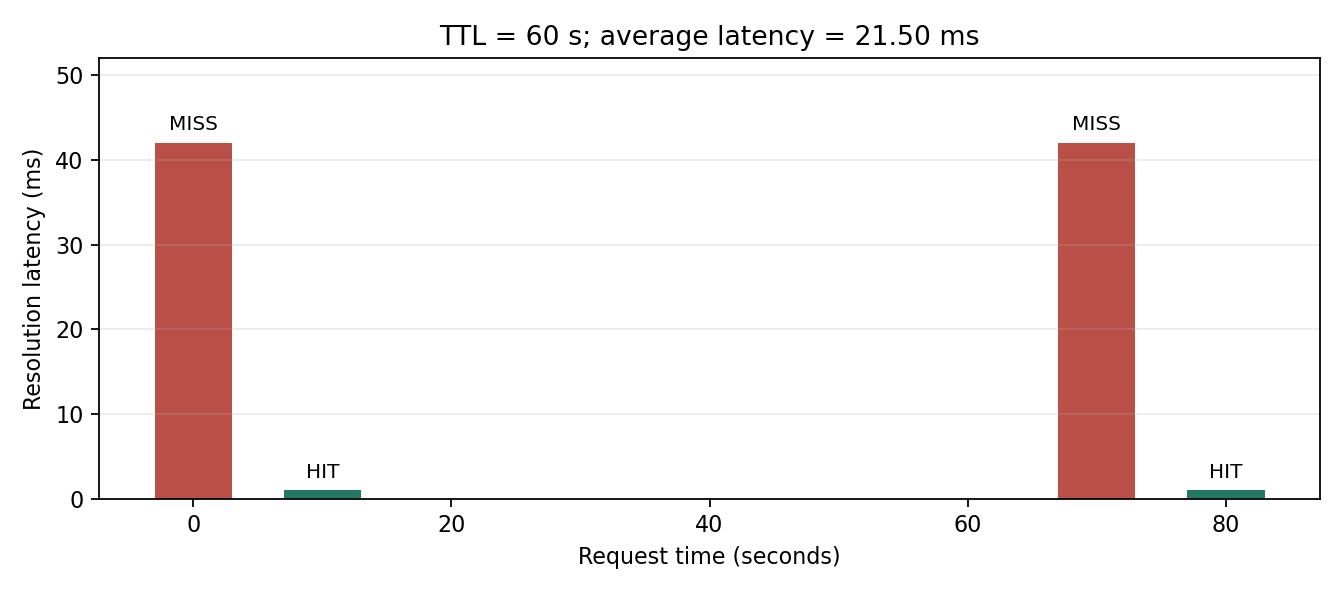
Set a miss to 42 ms, a hit to 1 ms, and issue requests at seconds [0, 10, 70, 80]. The entry populated at second zero expires before second seventy.
latencies = [42, 1, 42, 1] ms
average = (42 + 1 + 42 + 1) / 4 = 21.50 ms
hit_ratio = 2 / 4 = 50%
A longer TTL is not automatically correct: it reduces resolution work but lengthens the stale-address period during migrations or failover.
3. Runnable Experiment
Environment: Python 3.10+ and Matplotlib. No root access, external network, or live DNS target is required; the run reads a bundled scenario file.
cd network-fundamentals-lab
python3 -m venv .venv
source .venv/bin/activate
pip install -r requirements.txt
python src/dns_resolution_cache.py
expiry = -1
for at_second in [0, 10, 70, 80]:
hit = at_second < expiry
latency = 1 if hit else 42
if not hit:
expiry = at_second + 60The generated dns-cache-results.csv records request time, cache state, latency, and expiry for auditing.
4. Reading A Header In C
For diagnosis, an IP address alone hides failures. The lab’s C example decodes a fixed safe response header rather than sniffing real traffic:
cc -std=c11 -Wall -Wextra -O2 src/dns_packet_parser.c -o /tmp/dns_parser
/tmp/dns_parser
# txid=0x2a10 flags=0x8180 questions=1 answers=1
5. Animated Walkthrough
6. Engineering Checklist
- Log the queried name, record type, resolver, TTL, RCODE, and latency rather than only the final address.
- Coordinate lowered TTL windows with DNS migrations and rollback timing.
- Distinguish application, operating-system, and recursive-resolver cache behavior.
- Use
dig example.com A +noall +answer +statsfor observation only; its output is not the reproducible lab result.
Negative caching: the record is correct and still will not resolve
Everything computed above concerns the TTL of successful responses. The half that most often stalls a debugging session is the other one: failures get cached too.
When an authoritative server returns NXDOMAIN, that “does not exist” conclusion is retained by recursive resolvers for a period. Crucially, its duration is not governed by a record TTL — no record exists, so there is no TTL — but by the minimum field of the zone’s SOA record.
dig SOA example.com +short
# ns1.example.com. admin.example.com. 2026080801 7200 3600 1209600 3600
#                                                                  ^^^^
#                                     this last field is the negative TTL (seconds)
The typical sequence: you are about to add an A record, you query it first out of habit, that query returns NXDOMAIN and gets cached. You add the record, query again, and it still does not resolve — so you assume the record has not propagated and keep re-checking the DNS panel. What you are actually waiting on is the negative cache expiring, on a timer set by that last SOA field, which many defaults set to 3600 seconds.
Hence a genuinely useful habit: do not query a name before you have configured it. One unnecessary lookup can manufacture an hour of confusion.
There are several cache layers beyond the TTL
TTL binds recursive resolvers. Between your application and the authoritative server sit several more layers, each of which may keep its own copy and need not respect the TTL.
- The browser’s own DNS cache: Chrome maintains a separate resolution cache, typically on the order of a minute, independent of the system cache.
- The operating system: systemd-resolved, nscd and macOS’s mDNSResponder each have their own caching policy.
- The runtime or language layer: the most dangerous one. With a security manager installed, the JVM’s
networkaddress.cache.ttldefaults to -1, meaning cache forever. A long-running Java service that resolves a hostname once will keep connecting to that address after the target IP changes and the TTL long expires — until the process restarts.
This explains a characteristic pattern: after switching a server’s IP, most clients follow quickly while a few stubbornly keep hitting the old address. DNS did propagate; those particular clients retained the answer permanently at some layer.
Debug from the outside in: confirm authoritative data with dig @8.8.8.8, then check the recursive layer with a plain dig through the local resolver, and only then suspect the application. Skipping the first two steps and editing application configuration usually means fixing a problem that does not exist.
One situation invalidates all of the above: a transparent proxy on the local machine. Proxies of that kind return a synthetic address for each domain — commonly from a reserved range such as 198.18.0.0/15 — accept the connection there and forward by hostname. The IP dig reports then has no relationship to the destination actually connected to, and any conclusion drawn from resolution results is void. I covered that mechanism, and how it renders an entire egress check meaningless, in My SSRF Guard Blocked Itself.
7. DNS Resolution Evidence Matrix
DNS failures are often misreported as generic connectivity problems. The matrix below keeps resolver behavior, cache state, response headers, and migration timing separate so a reader can prove whether a slow or stale lookup came from the application cache, operating-system cache, recursive resolver, or authoritative records.
| Symptom | Evidence to collect | Likely layer | Verification boundary |
|---|---|---|---|
| First lookup is slow, later lookups are fast | Request time, TTL, cache hit/miss, resolver address, and latency. | Recursive resolver cache or OS resolver cache. | Compare cold resolver, warm resolver, and application cache behavior. |
| Some users still reach an old address | Authoritative answer, recursive answer, remaining TTL, and change time. | TTL propagation and resolver cache. | Do not treat authoritative update as proof every resolver has expired. |
| Lookup succeeds but HTTP fails | Resolved IP, record type, SNI hostname, route, and TLS certificate. | Post-DNS network, TLS, or application routing layer. | DNS only proves name-to-address mapping, not service readiness. |
| Private or proxy traffic leaks DNS | Local port 53 traffic, DoH/DoT settings, proxy DNS mode, and app resolver logs. | Application bypassing the intended resolver path. | Capture both local resolver traffic and proxy-side hostname requests. |
FAQ
Does TTL zero eliminate stale responses?
It removes much of the cache benefit without controlling every intermediary. Planned, temporary low TTL is generally a more usable migration tool.
Why does this lab avoid packet capture?
Fixed bytes preserve repeatability and are sufficient for header reasoning, while captures add permission and environment variation.
References
- RFC 1034: Domain Names – Concepts and Facilities
- RFC 1035: Domain Names – Implementation and Specification
The next article takes the resolved address and calculates route selection and MTU boundaries.