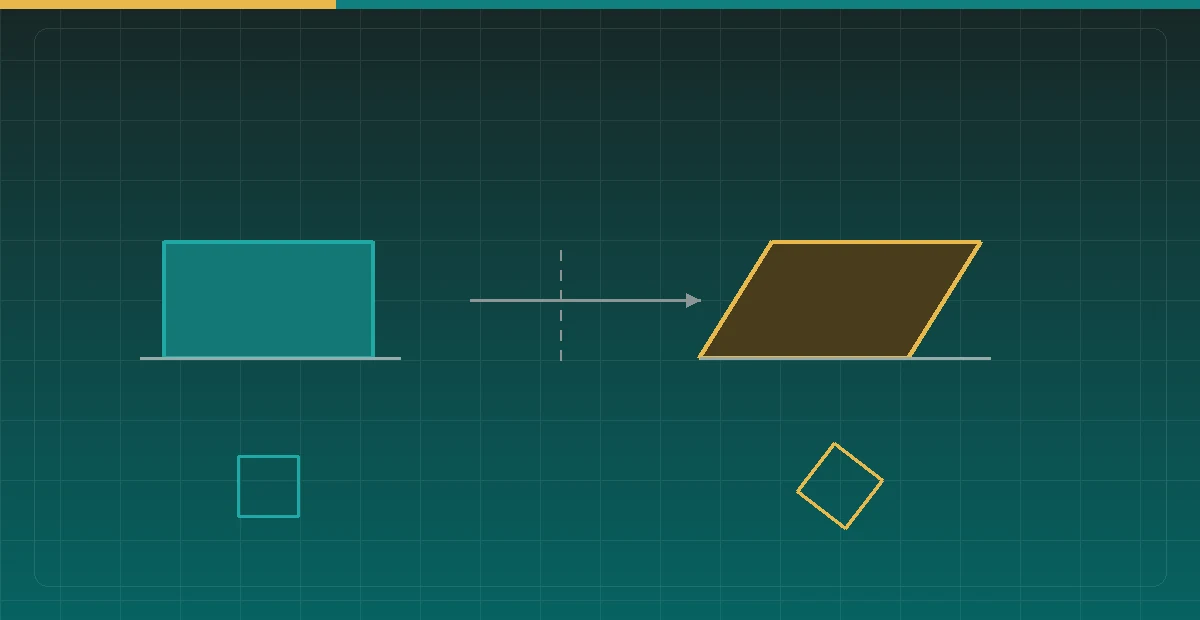

Squash and stretch is the first of the twelve principles of animation to get taught, and the one most easily misread as “just scale the picture.” Wire it into a skeletal system and you discover that nearly all of the difficulty comes from a single fact: non-uniform scale does not propagate down a hierarchy as safely as rotation and translation do.
This covers the small amount of mathematics behind “volume preservation,” then what that hierarchy trap actually looks like and why the standard matrix product produces the wrong shape, and finally the scaling pivot, the timing, and what to do instead when things move too fast.
In two dimensions, volume preservation means area
Squash and stretch reads as weight because the audience assumes an object’s volume is constant — flatten it and it should widen, stretch it and it should thin. The two-dimensional equivalent is area.
The construction is trivial: scale one axis by s and the other by 1/s, and the area s · (1/s) = 1 is unchanged.
def squash(s):
    return (s, 1.0 / s)        # s along the main axis, the other compensates
Two things are not preserved along with it, and both show up in practice.
The first is perimeter. A circle of radius r squashed into an ellipse with semi-axes rs and r/s keeps its area but gains perimeter. If the character has outlines and the stroke width scales with the transform, line weight changes visibly at the moment of the squash — it looks like the drawing switched pens. In vector rendering, set strokes not to scale with the transform; in raster, either bake the outline in and accept the change, or draw the outline as a separate unscaled layer.
The second is how extreme values read. Strict 1/s at s = 0.4 demands the other axis grow to 2.5×, and the eye rejects it as “too much, that is not the same object any more.” The practical fix is an exponent on the compensation:
sy = 1.0 / (s ** alpha) # alpha around 0.6 to 0.8alpha = 1 is strict area preservation; lowering it pulls extreme poses back in. That is not sloppiness — it is acknowledging that the audience judges plausibility, not area.
Pick the wrong pivot and the ball sinks into the floor
Before any hierarchy code, there is a more basic trap: what point does the scale happen around?
When a ball lands and squashes, the audience expects its underside to stay planted on the ground while the top compresses downward. Scale about the centroid instead and, on the frame where s = 0.7, the ball’s bottom edge rises by 0.15 · height — the ball appears to float slightly at the instant of contact and then drop again. It is a small artefact, and it lands squarely on the frame that draws the most attention.
The fix is to anchor the scale at the contact point — whichever position ought to stay fixed through the deformation:
def scale_about(p, anchor, sx, sy):
    return (anchor.x + (p.x - anchor.x) * sx,
            anchor.y + (p.y - anchor.y) * sy)
Generalised: the anchor belongs at the point that is semantically stationary. The bottom for a landing ball, the shoulder for an arm hoisting a weight, the fixed end of a rope being pulled. Getting it wrong raises no error; it just adds a drift nobody can quite name.
The real trap: scale cannot pass through a rotation
Here is the core of it. In a skeletal system each node’s world transform is the parent’s transform times its own local transform, and that local transform is usually written as a product of translation, rotation and scale. This works perfectly for translation and rotation. It does not work for non-uniform scale.
Multiply a parent’s scale matrix S by a child’s rotation matrix R and it becomes obvious. Take S = diag(sx, sy) and R a rotation by θ:
S · R = | sx·cosθ   -sx·sinθ |
        | sy·sinθ    sy·cosθ |
When sx ≠ sy the two column vectors of this matrix are no longer orthogonal. It is not “a rotation and a scale” — it contains shear. So a child node that sits beneath a squashed parent and carries a rotation of its own does not come out squashed. It comes out skewed.
The symptom is easy to recognise: when the character squashes as a whole, every part rotated relative to the body — a raised arm, a foot turned outward, a tilted head — becomes a parallelogram, as though it had been pushed over. Parts with no rotation are fine, because S · R = S when θ = 0. “Only the rotated parts deform wrongly” is this bug’s signature.
One clarification: the shear is not an implementation bug. The multiplication is correct and faithfully expresses “squash in the parent’s space, then rotate in the child’s space.” The problem is that this is not the semantics the animator wants. What they have in mind is “the whole character is squashed, and each part keeps its own shape.”
Three fixes, and which to choose
The first is to exclude scale from inheritance. Parents pass down position and rotation but not scale; each node’s scale affects only itself. Most 2D skeletal tools have this switch, usually named something like “do not inherit scale.” The cost is that a parent’s squash no longer drives its children automatically, so anything that should deform needs its own value — in exchange for shapes that are always correct.
The second is to defer scale to the end. Propagate only translation and rotation through the hierarchy, and once every vertex has a world position, apply one squash in world space. The whole character gets compressed like a single image, which is the closest match to the animator’s intuition and the simplest to implement. It suits whole-body squash — landings, impacts, wind-ups. Its limitation is that it cannot express “squash this leg only.”
world = parent_trs_without_scale @ local_trs_without_scale
p = world @ vertex
p = scale_about(p, contact_point, sx, sy)   # last step, in world space
The third is to decompose and rebuild: after each multiplication, factor the matrix back into rotation and scale and discard the shear component. It looks like the general solution and is the one I would recommend least. Polar decomposition every frame is both costly and numerically touchy, and discarding shear means the result no longer equals any well-defined operation — when something looks wrong, nobody can explain how the current shape arose.
In real projects the choice usually comes out as: whole-body deformation via the second approach, local control via the first, and the two coexisting — most nodes do not inherit scale, and the landing squash happens in that final world-space pass.
Let velocity drive the squash
Hand-keying the squash amount frame by frame is expensive, and it has to be redone whenever the primary action changes. In most cases you can derive it from velocity instead: the faster the object moves, the more it elongates along its direction of travel.
speed = length(velocity)
s = 1.0 + clamp(speed * gain, 0.0, max_stretch)   # stretch along the motion
axis = normalize(velocity)                        # the direction to stretch in
Combine s with 1/s^alpha perpendicular to it, oriented along axis, and the stretch becomes automatic. On landing, speed collapses to zero at the same moment contact occurs, so a negative offset that pushes s below 1 produces the squash. The whole effect needs two tunable parameters.
There is one trap you will certainly hit: when speed approaches zero the direction is meaningless. At the apex of an arc, or in the instant of a pause between movements, the velocity vector’s direction spins wildly on floating-point noise, and the stretch axis spins with it. Even though s is near 1 and the deformation is tiny by then, the edges visibly shimmer.
The fix is not simply to smooth the direction — a direction is an angle, and smoothing it brings back the same wraparound problem. The dependable approach is a speed threshold below which you freeze the last valid direction:
if speed > MIN_SPEED:
    last_axis = normalize(velocity)
axis = last_axis          # reuse the last valid direction when slow
Freezing costs nothing visually, because deformation is already approaching zero there and no axis choice is distinguishable. The rule holds for anything driven by a vector’s direction — smears, speed lines, orientation alignment — all of them should retain the previous direction when the magnitude gets small, rather than normalising a near-zero vector.
Frame count matters more than the curve
Beyond the mathematics, squash and stretch depends heavily on how many frames it occupies.
A typical landing runs: anticipation (crouch and load) → contact → squash → rebound stretch → settle. Within that, the squash is usually a single frame. At 24 fps with the animation shot on twos — each drawing held for two frames — the squash is often exactly one drawing.
Holding the squash too long is the most common beginner mistake, and it reads as the character turning to rubber. The test is direct: pull the squash frame out and look at it alone. It should feel like a transitional drawing you were not meant to see clearly. If you can study it comfortably, it is on screen too long.
The rebound stretch is generally smaller than the squash — roughly half to two thirds of it — and should ease back to neutral fast at first and slowly at the end. Reversing that relationship, with a stretch more extreme than the squash, drains the object of weight.
Past a certain speed, use a smear instead
There is one case squash and stretch cannot solve: the object is moving too fast.
The threshold can be stated numerically. If the object’s per-frame displacement exceeds its own size along the direction of travel, consecutive frames no longer overlap in space, and what the audience perceives is not motion but a series of discrete positions — strobing. Elongating the object along its path (the traditional animator’s “smear”) manufactures that overlap and restores continuity.
need_smear = speed_px_per_frame > object_size_along_motionA smear’s length is roughly one frame of displacement — just enough for this frame’s shape to meet the previous frame’s position. Longer than that reads as an afterimage rather than motion. It is fundamentally a substitute for motion blur: animators in the film era arrived at it by studying live-action photography, and it works for exactly the same reason motion blur works in a modern renderer.
Worth noting: once you are smearing, abandon the area preservation from earlier. A smear exists to fool perception along the time axis, not to depict a compressed object, and strict preservation at that point just makes the shape look too thin.
What can be checked automatically
Most of this is judged by eye, but three things can be written as checks and caught during rigging.
First, an orthogonality check. Walk the skeleton and take the dot product of the two column vectors of each node’s world matrix. It should be close to zero; anything substantially non-zero means that node has picked up shear — it carries a rotation beneath a non-uniformly scaled parent. This catches the trap above at rig time, rather than waiting for an artist to report that “the arm looks odd.”
Second, an area drift check. Play a full animation, compute the area of the character’s silhouette each frame, and plot it. Fluctuation from squash and stretch is expected, but the curve should not show a sustained one-way drift — that usually means some scale is being applied twice, for instance both inherited through the hierarchy and applied again in the final pass.
Third, an anchor displacement check. For every deformation that declares a contact point, measure how far that point moves between the pre- and post-deformation states. It should be exactly zero. Anything else is a misconfigured scaling pivot — the ball sinking into the floor, from earlier.